What actually affects a security camera's WiFi connection?
Smart Home Cameras 2026-09-29 02:00:00
EZVIZ
Best Home Security Cameras for Reliable WiFi Connection
Best Home Security Cameras for Reliable WiFi Connection
Quick Answer
There is no single home security camera with the most stable Wi-Fi connection in every property. Actual performance depends on the router’s position, the camera’s distance from it, walls, interference, network congestion and the Wi-Fi band being used.
Table of Contents
When comparing cameras, look beyond resolution. Dual-band Wi-Fi can provide more choice between 2.4GHz and 5GHz, while an Ethernet port offers an alternative to a Wi-Fi-only installation. Adaptive frame rate or bit rate can also adjust transmission behaviour, although these features do not guarantee that a camera will never disconnect.
Selected EZVIZ models illustrate different connectivity configurations rather than a ranked reliability result. The E6 supports 2.4GHz and 5GHz Wi-Fi as well as RJ45 Ethernet. The C7 Dual combines 2.4GHz/5GHz-related connectivity, pairing options, adaptive video bit rate and RJ45 Ethernet. The standard CB8 Lite Wi-Fi model and C6N Black focus on 2.4GHz Wi-Fi, with the C6N Black also providing an Ethernet option.
Key Factors Affecting Security Camera WiFi Stability and Performance
Wi-Fi band
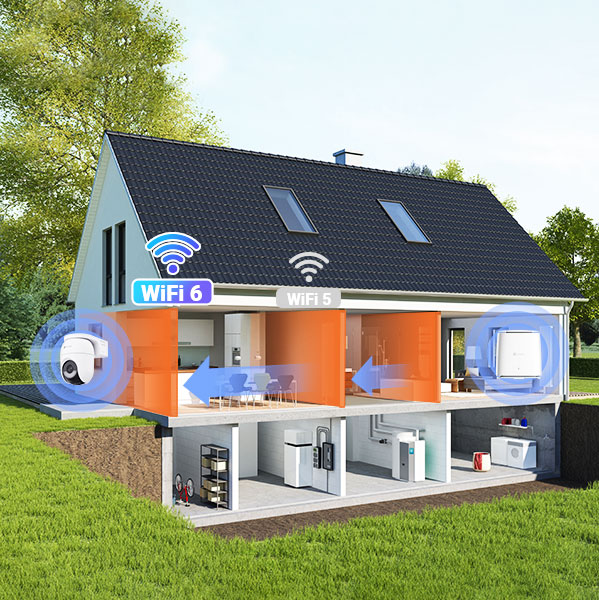
2.4GHz and 5GHz are not universally better or worse. The suitable option depends on the layout of the property and the surrounding wireless environment. 2.4GHz can be useful where the camera is further from the router or there are more obstacles, while 5GHz may suit a camera positioned closer to the router. Congestion and interference also matter.
A dual-band camera gives you more flexibility because it supports both frequency ranges. The EZVIZ E6, for example, supports 2.4GHz and 5GHz Wi-Fi, IEEE 802.11a/b/g/n/ac and 40MHz channel bandwidth.
Distance, walls and obstructions
The physical route between the router and camera affects connection quality. Several walls, thick construction materials, large appliances or metal objects can weaken the signal. A camera that works reliably near the router may behave differently when installed at the far end of a house or outside it.
The camera’s resolution does not determine Wi-Fi stability on its own. A high-resolution stream can place greater demands on the network, but the installation environment and the available connection method remain important.
Ethernet as an alternative
A Wi-Fi security camera is not necessarily Wi-Fi-only. If wireless performance is inconsistent and cabling is practical, an RJ45 Ethernet connection provides another way to connect the camera to the local network.
The EZVIZ E6 and C7 Dual both provide RJ45 Ethernet. The C6N Black also has an RJ45 10/100M self-adaptive Ethernet port, allowing a setup to use either its documented 2.4GHz Wi-Fi connection or a wired connection.
Adaptive transmission
Some cameras can adjust aspects of transmission to suit current network conditions. The E6 supports adaptive frame rate, video bit rate and audio bit rate. The C7 Dual supports adaptive video bit rate, while the standard CB8 Lite Wi-Fi model supports adaptive frame rate and adaptive video bit rate.
These features may help the camera adjust how it sends video, but they should not be treated as a promise that buffering or disconnections cannot occur.
Wireless congestion and internet access
Other devices using the same wireless network can affect available capacity. It is also important to separate two different connections: the camera’s local Wi-Fi connection to the router, and the internet connection needed for remote viewing or cloud services. A camera can have a local connection to the router while the wider internet connection is unavailable.
Choosing a Security Camera Based on Your Property and Network Setup
The most suitable camera depends on the problem you are trying to solve, not on an overall ranking.
I want dual-band flexibility
The EZVIZ E6 supports both 2.4GHz and 5GHz Wi-Fi and also provides an RJ45 Ethernet port. This gives an indoor setup several documented connection options, depending on the router, camera position and available cabling.
I want dual-band Wi-Fi with a wired alternative
The EZVIZ C7 Dual supports 2.4GHz/5GHz-related Wi-Fi connectivity, IEEE 802.11ax, AP Pairing and Bluetooth Pairing. It also includes an RJ45 10/100M self-adaptive Ethernet port. This configuration may suit a home network where users want wireless flexibility but would prefer a wired option when available.
I need a 2.4GHz camera with an Ethernet option
The EZVIZ C6N Black supports IEEE 802.11b/g/n on the 2.4GHz band, AP Pairing and an RJ45 10/100M self-adaptive Ethernet port. It can therefore illustrate a basic 2.4GHz setup with the possibility of using Ethernet instead of relying only on Wi-Fi.
I want a 2.4GHz wireless setup with adaptive transmission
The standard EZVIZ CB8 Lite Wi-Fi model supports IEEE 802.11b/g/n/ax on 2.4GHz, AP pairing and adaptive frame and video bit rates. It may fit a setup where the router and camera can communicate over 2.4GHz and the user wants documented adaptive transmission features. Its UK specifications do not indicate 4G fallback, so it should not be presented as a camera that continues through a Wi-Fi outage using cellular connectivity (which is distinct from the separately available CB8 Lite 4G model).
In each case, check the property’s distance, walls, router coverage and cabling options before choosing a model.
Detailed Connectivity Features of Selected EZVIZ Security Cameras
EZVIZ cameras offer different ways to approach home-network connectivity. The following examples are grouped by their documented connection features, not ranked by stability.
EZVIZ E6: dual-band indoor connectivity
The E6 supports 2.4GHz and 5GHz Wi-Fi, IEEE 802.11a/b/g/n/ac and RJ45 Ethernet. Its adaptive frame rate, video bit rate and audio bit rate are also relevant when considering how video is transmitted across a home network. It is a practical example of an indoor camera that supports both wireless frequency options and a wired connection.
EZVIZ C7 Dual: dual-band and wired options
The C7 Dual supports 2.4GHz/5GHz-related connectivity, IEEE 802.11ax, AP Pairing and Bluetooth Pairing. Its RJ45 10/100M self-adaptive Ethernet port provides a wired alternative, while adaptive video bit rate is part of its documented transmission specification. This combination can suit users who want several ways to configure the camera within a home network.
EZVIZ C6N Black: 2.4GHz Wi-Fi with Ethernet
The C6N Black supports 2.4GHz IEEE 802.11b/g/n Wi-Fi and AP Pairing. It also includes an RJ45 10/100M self-adaptive Ethernet port. This makes its connectivity story straightforward: it can be considered for a 2.4GHz wireless installation or a compatible wired setup.
EZVIZ CB8 Lite: 2.4GHz Wi-Fi and adaptive transmission
The standard CB8 Lite Wi-Fi model supports 2.4GHz IEEE 802.11b/g/n/ax, AP pairing, adaptive frame rate and adaptive video bit rate. These are documented Wi-Fi and transmission features, not evidence of a guaranteed connection. The available specifications do not state 4G capability or automatic cellular fallback, making it distinct from the separately sold CB8 Lite 4G cellular model.
For any of these models, the final result will still depend on the router, placement, obstacles and wider network conditions.
Practical Steps to Improve and Maintain a Stable Camera Connection
A few installation decisions can make a camera connection more dependable:
Place the camera within a reasonable distance of the router and avoid unnecessary walls or obstructions between them.
Consider the number and thickness of walls, as well as large objects that may interfere with the signal.
Use the supported Wi-Fi band that best fits the installation. Do not assume that 2.4GHz or 5GHz is always superior.
Reduce avoidable wireless congestion where possible by reviewing other devices and network activity.
Consider Ethernet if the camera’s location and the property allow a wired connection. The EZVIZ E6, C7 Dual and C6N Black all document RJ45 connectivity.
For a larger property, review overall router coverage and consider whether the existing network needs a better-positioned access point or other coverage solution.
Remember that local Wi-Fi and internet access are different. The local connection links the camera to the router; remote viewing and cloud services may also require the router’s internet connection. Improving one does not automatically fix problems with the other.
Documented Specifications Comparison Table for Camera Connectivity
The table does not show a single winner because the useful feature depends on the home network. Dual-band support may be valuable in one property, while Ethernet may be more useful in another.
Essential WiFi Security Camera Pre-Purchase Checklist
Before choosing a camera, ask:
Do I need both Wi-Fi bands? Check whether the model supports 2.4GHz and 5GHz if you want more choice when configuring the network. The EZVIZ E6 and C7 Dual are examples with documented dual-band-related support.
Would Ethernet be more predictable? If cabling is practical, an RJ45 connection can provide an alternative to wireless. The EZVIZ E6, C7 Dual and C6N Black document Ethernet connectivity.
How far is the camera from the router? Consider distance, walls and obstructions rather than relying on resolution as an indicator of connection performance.
Is the wireless environment congested? Nearby networks and connected devices can affect available capacity.
Does the camera’s documented standard match my network? Check the supported Wi-Fi band, standard and pairing method before purchase.
Do I need adaptive transmission? Features such as adaptive frame rate or bit rate may help the camera adjust its transmission behaviour, but they are not guarantees against buffering or disconnections.
The right choice is the one whose documented connection options match the property and installation. No specification alone can guarantee a stable connection in every room or every home.
Frequently Asked Questions About Security Camera WiFi Stability
What makes a security camera’s Wi-Fi connection stable?
Connection dependability is influenced by the camera’s supported Wi-Fi bands, distance from the router, walls and obstructions, interference, network congestion and whether Ethernet is available. Adaptive transmission may help manage video delivery, but it does not guarantee uninterrupted service.
Is 2.4GHz or 5GHz better for security cameras?
Neither is always better. 2.4GHz may suit a longer or more obstructed route, while 5GHz may suit a camera closer to the router in an appropriate network environment. The best option depends on the property and router.
Is dual-band Wi-Fi better for a security camera?
Dual-band support can be more flexible because it gives users access to both 2.4GHz and 5GHz, where supported by the network. It does not automatically make the connection stable in every location.
Can I connect a Wi-Fi security camera with Ethernet?
Some can. A camera described as a Wi-Fi camera is not necessarily Wi-Fi-only. The EZVIZ E6, C7 Dual and C6N Black all document RJ45 Ethernet connections.
What should I do if my security camera keeps disconnecting?
Check the camera’s distance from the router, the number of walls in between, possible interference and network congestion. Try the other supported Wi-Fi band where available, improve router placement or consider Ethernet if the installation allows it.
Does distance from the router affect a security camera?
Yes. Greater distance and more physical obstructions can reduce the quality of the wireless connection. The same camera may perform differently in two rooms or properties because the network environment is different.
Can the standard EZVIZ CB8 Lite Wi-Fi model continue through a Wi-Fi outage using 4G?
The standard CB8 Lite Wi-Fi model documents 2.4GHz Wi-Fi, AP pairing and adaptive transmission. Its UK product specifications do not list 4G or automatic cellular-fallback capability. EZVIZ also sells a separate CB8 Lite 4G model, which should not be confused with the Wi-Fi-only version.
Does a security camera need a strong internet connection for live viewing?
Remote live viewing generally requires the camera to reach the router and the router to have internet access. These are separate issues: a camera may have a local Wi-Fi connection even when the wider internet connection is unavailable.
Can a Wi-Fi camera work without internet?
That depends on the camera’s functions and setup. A local connection to the router is different from internet access for remote viewing or cloud services. Check the product’s documented operating requirements before assuming which features will work offline.
This website uses cookies to store info on your device. Cookies help our website work normally and show us how we can improve your user experience. By continuing to browse the site you are agreeing to our cookie policy and privacy policy.
We provide you with customized service and safe user experience with Cookie. Login and browse our website indicates that you permitted us getting information in/out the website with Cookie. Please visit Use of Cookies



 EZVIZ no longer supports Internet Explorer 10 or earlier versions, and the site may not behave as expected. Please upgrade to a newer browser.

